Why Passport Compliance Is Critical for India eVisa Approval
Passport scan issues represent the second most common reason for India eVisa application delays or rejections, right after photo specification errors. The official India eVisa system relies on automated verification tools to confirm that your uploaded passport bio page matches the information you entered in your application form. If your scan is blurry, cropped incorrectly, or saved in the wrong format, your application may be flagged for manual review or returned with a request to resubmit. This adds unnecessary time to your processing timeline and can disrupt your travel plans.
Travelers from Australia and Canada often assume that any clear photo of their passport will suffice, but the technical requirements are more specific than many realize. This guide provides a step by step walkthrough for preparing a compliant passport scan at home using your smartphone or a standard scanner. We also explain the validity rules, blank page requirements, and naming conventions that Indian immigration authorities use to verify applications. By following these guidelines carefully, you reduce the risk of processing delays and help ensure your application moves smoothly through the official portal.
Remember that Get India E-Visa is an independent assistance service. We are not affiliated with the Government of India, and we do not issue visas. Our team manually reviews passport uploads during the guided application process to catch potential issues before they reach the official system. This extra layer of review helps travelers from over 40 eligible nations submit stronger, more complete applications with greater confidence.
Passport Validity Rules and Blank Page Requirements
Your passport must be valid for at least six months from your expected date of arrival in India. This rule applies to all nationalities eligible for the India eVisa program, including travelers from the United States, the United Kingdom, and Belgium. If your passport expires within six months of your planned arrival date, Indian immigration authorities will not approve your eVisa application, regardless of your travel purpose or itinerary. You must renew your passport before applying.
In addition to validity, your passport must contain at least two blank pages designated for immigration stamps. These pages should be completely free of any markings, visas, or entry stamps from previous trips. The blank pages do not need to be consecutive, but they must be located in the main passport booklet, not in the endorsement or observation sections at the back. Many travelers overlook this requirement until they reach the airport, which can cause entry delays or denial of boarding by airlines. Before you begin your eVisa application, open your passport and verify both the expiry date and the availability of blank stamp pages. If you hold dual citizenship, ensure you apply using the passport you intend to use for travel to India, as the eVisa is electronically linked to the specific passport number provided during application.
Name consistency is also critical. The name you enter in your eVisa application must match exactly how it appears on your passport bio page, including spelling, spacing, and order. Even minor discrepancies, such as a missing middle initial or a different name order, can trigger verification failures. For travelers who have recently changed their name due to marriage or legal processes, we recommend applying with the passport that reflects your current legal name and carrying supporting documentation, such as a marriage certificate, when you travel.
How to Scan Your Passport Bio Page Correctly at Home
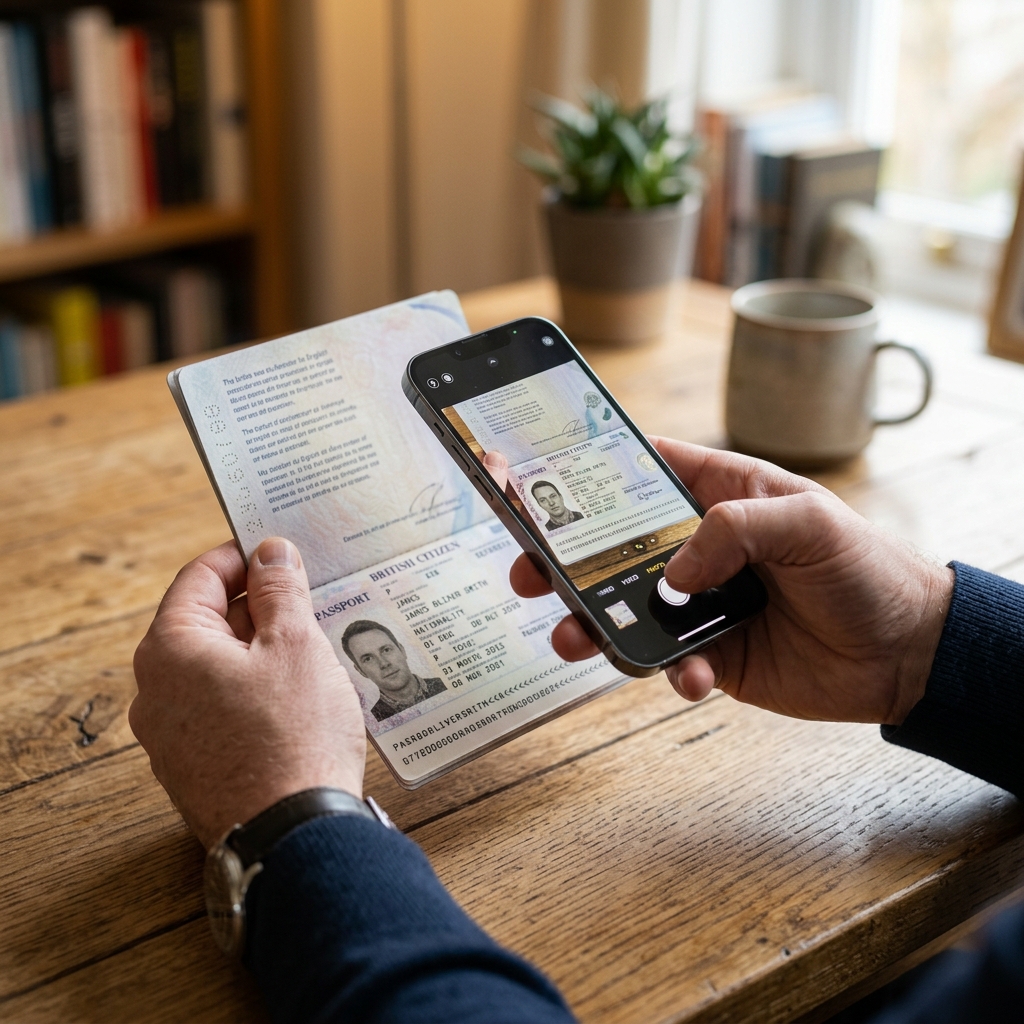
Preparing a compliant passport scan does not require professional equipment. Most modern smartphones can capture a clear, legible image of your passport bio page when used with proper technique. Start by placing your passport on a flat, well lit surface with the bio page fully open. Avoid taking the photo at an angle, as this can cause distortion that interferes with automated verification systems. Position your phone directly above the page, parallel to the surface, and ensure the entire bio page fits within the frame without cutting off any edges. Use natural daylight or bright indoor lighting to minimize shadows and glare.
Avoid using flash, as it can create hotspots that obscure text or your photograph. Once you have captured the image, review it on a larger screen to confirm that all text is sharp and readable, your photo is clearly visible, and no part of the page is blurred or cut off. The India eVisa portal requires passport scans to be uploaded in PDF format, with a file size between 10 kilobytes and 300 kilobytes. If your image is in JPEG or PNG format, use a free online converter or a built in phone feature to save it as a PDF.
If the file exceeds 300 KB, use a PDF compressor tool to reduce the size without sacrificing clarity. Avoid aggressive compression that makes text pixelated or difficult to read. Name your file descriptively, such as yourname_passport_bio.pdf, to help you locate it easily during the application process. For additional guidance on preparing your full application package, including photo specifications, visit our guide on India eVisa photo requirements. Travelers from Australia and other eligible nations can also request a pre submission review through our guided support service to verify their passport scan before final submission.
Common Passport Upload Errors and How to Avoid Them
Understanding why passport scans get rejected helps you avoid these pitfalls during your own application. The most frequent errors include blurry or low resolution images, incorrect file format, file size outside the acceptable range, and incomplete cropping that cuts off important details. If your scan shows only part of the bio page, such as missing the machine readable zone at the bottom or cropping out your photograph, it will not meet verification standards. Ensure your image captures the entire page from edge to edge, with all text, your photo, and the passport number clearly visible.
Another common issue is uploading a photo of the passport cover or an internal page instead of the bio page. The India eVisa system specifically requires the page that contains your photograph, full name, date of birth, passport number, and expiry date. Double check that you are uploading the correct page before submitting. File format errors also cause frequent rejections.
The official portal accepts only PDF files for passport uploads. If you submit a JPEG, PNG, or HEIC file, the system may not process it correctly. Convert your image to PDF before uploading, and verify the file size falls between 10 KB and 300 KB. If your application is returned with a passport error, do not panic. You can usually resubmit a corrected scan without restarting the entire application process. However, this adds time to your processing timeline, so it is always better to get the scan right on the first attempt. Travelers from the United States and other eligible countries can reduce uncertainty by having their passport scan reviewed by our team before final submission through our guided application support.
How Get India E-Visa Supports Your Application Process
Get India E-Visa is an independent assistance service with over 20 years of experience in the visa industry. We are not affiliated with the Government of India, and we do not issue visas or guarantee approvals. All final decisions rest solely with Indian immigration authorities. Our role is to help travelers from over 40 eligible nations prepare accurate, complete applications before they reach the official portal.
We collect basic travel details first, such as your intended arrival date, purpose of visit, and contact information. Only after our experts manually verify that your initial information meets compliance standards do we request sensitive documents like passport scans through secure, encrypted channels.
This privacy first approach protects your personal information while ensuring your application meets technical requirements. Government fees for India eVisas are set by Indian authorities and vary by duration and nationality. Standard fees are 24 dollars for the 30 day option, 40 dollars for one year, and 200 dollars for five years. Travelers from the United Kingdom pay 484 dollars for the five year option due to reciprocal fee arrangements. Our service fee is always displayed separately so you understand exactly what covers government processing and what supports our application review and human verification services. We never promise approvals, but we do help you avoid common errors that cause delays. Select your country page to compare eVisa duration options, review the complete fee breakdown, and start a guided application request with expert support. Our team is ready to help you prepare a compliant passport scan and complete application package that meets official specifications.
Frequently Asked Questions
How long must my passport be valid to apply for an India eVisa?
How many blank pages does my passport need for India entry?
What file format and size is required for passport scans?
Can I use a photo of my passport instead of a scan?
What should I do if my name on the application does not match my passport exactly?
How can travelers from Belgium ensure their passport scan meets requirements?
Important Disclaimer: Get India E-Visa is an independent assistance service and is not affiliated with the Government of India. We do not issue visas or guarantee approvals. All visa decisions are made solely by Indian immigration authorities. Government fees are set by Indian authorities and are separate from our service fee.